TripTronic 3000 · Owner support
Calibration help that can read your screen.
Photograph the Advanced Calibration and Calibration Data screens and attach them. The assistant reads the live values and the trace, checks them against the TripTronic 3000 manual and Veytech's commissioning notes, and tells you where the detection window should sit and what to try next. Electrical work is always referred to a technician.
TT3000 Support AssistantReady
Hello. I'm the TripTronic 3000 support assistant. Tell me what the controller is showing (LEDs, the Run screen status, any message on the calibration screens) and what the belt was doing at the time.
For window positioning, attach a photo of the Advanced Calibration screen and, if you can, the Calibration Data screen. I'll read the values off the photo and suggest the next step.
Electrical faults or anything inside the enclosure are for licensed personnel. Veytech is on 1300 01 TRIP.
The assistant is offline right nowUse the quick reference alongside, or call 1300 01 TRIP.
Answers are generated from the TripTronic 3000 User Manual V5 and Veytech commissioning notes and can be wrong. Follow site isolation procedures. Never open the controller enclosure unless licensed and authorised.
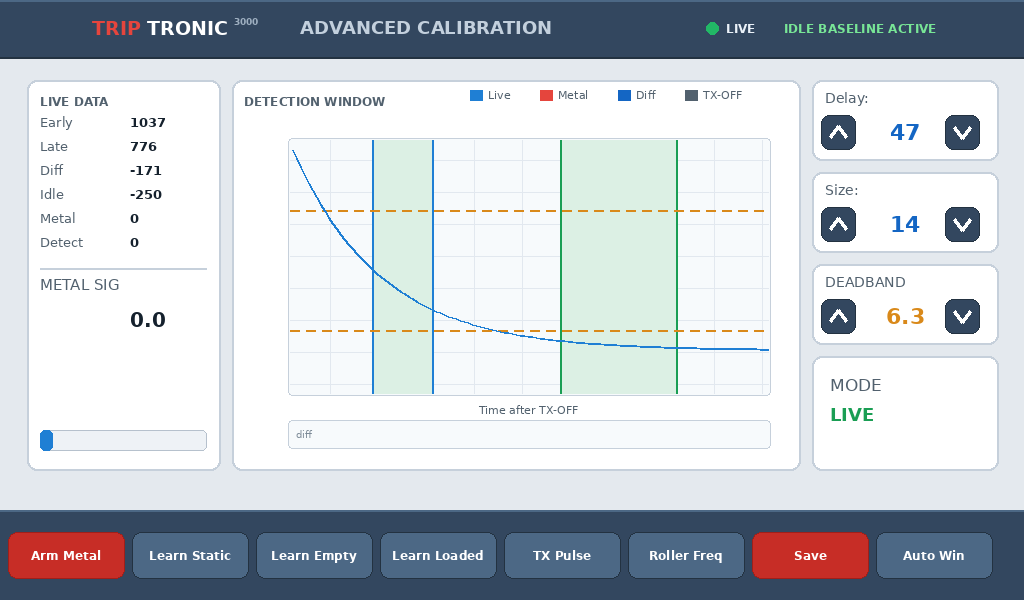
What to photograph: Advanced Calibration
 1
2
3
4
1
2
3
4
- Live Data: Early, Late, Diff, Idle, Metal, Detect
- Detection window: both shaded windows and the trace
- Delay, Size, Deadband values
- Status: LIVE and baseline state in the header
Front-panel LEDs
- NORMAL: Run mode, no metal, no fault.
- ALARM: metal detected and not reset, or a fault is present. Check View › Alarms.
- BYPASS: alarm relay disabled; also lit in Calibrate mode.
False tripping: order of checks
- Balance the coils: fewer than five bars either side of centre.
- Re-learn the idle baseline for the operating condition (Static / Empty / Loaded).
- Investigate noise: bars rising as the empty belt starts point to vibration or electrical noise. Check coil mounts, nearby idlers, conduit separation; switch nearby systems off one at a time; try Operating Frequency A/B.
- Conductive ore (quiet empty, noisy loaded): move the detection window later.
- Only then lower sensitivity.
Reading the detection-window trace
- Blue
Liveis the current capture, redMetalthe last Arm Metal capture, dark blueDiffthe difference; orange dashed lines are the deadband. - The first shaded window is the early reference; the second is the detection window set by
DelayandSize. - The detection window belongs where Metal separates most from Live on a flat part of the trace, not on a steep slope or across a sharp valley, and never overlapping the reference window.
- At idle
Metalshould sit near 0 andDiffclose toIdle. Re-learn after any window change.
IDLE LEARN REJECTED
The background was not stable enough to learn. Remove loose metal and magnetic objects near the frame, eliminate vibration and electrical interference, confirm belt speed is stable, and repeat. Persistent rejection while running points to belt clips, magnetised belt sections or a noise source.
Coil resistance checks (power isolated)
- Transmitter coil
1.8 – 2.8 Ω; outside range = coil or cable compromised. - Receiver coil
450 – 500 Ω; above 500 Ω = coil compromised; above ~2500 Ω through a junction box = box wiring compromised.
Alarm status bits (Modbus register 1505)
0x0001Metal detected ·0x0002Long bar0x0004Coil driver short ·0x0008Coil driver open ·0x0010Coil driver high voltage0x0020Balance fault ·0x0040High pile ·0x0080ADC overload0x0100Reset disable ·0x0200DSP comms ·0x0400Settings CRC ·0x0800Firmware CRC0x1000MCU over-temp warning (≥85 °C) ·0x2000MCU over-temp critical (≥95 °C, outputs inhibited) ·0x8000Bypass active
Safety. Voltages above 230 V are present inside the enclosure. Electrical and internal controller work is for licensed, authorised personnel only. Stop and isolate the conveyor before working near the frame.
Need a person, not a page?
Our engineers support every TripTronic 3000 we have built. Call 1300 01 TRIP or email the serial number and a photo of the screen.